one-spa 6

· 10 min read

We have released one-spa@6! We are committed to a stable one-spa runtime with very few breaking changes. We expect over 95% of one-spa users can upgrade easily without altering their changes!

Summary

one-spa@6 provides advanced features such as async navigation cancelation and parcel-only mode (via patchHistoryApi), while also updating the package configuration to use modern NodeJS and bundler features like package entrypoints and "type": "module". We also updated urlRerouteOnly to default to true, as it boosts performance and we consider it to be a best practice to author applications that work when urlRerouteOnly is set to true.

Browser Support / IE11

We still support IE11 and the same versions of NodeJS (at least as old as Node 10). However, we've changed our defaults such that IE11 is only supported with some additional configuration, as described in the IE11 Migration section below.

For the one-spa npm package, we plan one-spa@6 to be the last major version that supports IE11. In general, we've released a major version of one-spa every 1-2 years. We do not have a concrete timeline or plans for one-spa@7, and will accept community contributions for any important patches to one-spa@6 after one-spa@7 is released.

For all surrounding packages (one-spa-react, one-spa-vue, systemjs-webpack-interop, one-spa-angular, etc) we may begin dropping IE11 support sooner than the one-spa@7 release. As we do so, we'll create documentation that lists the latest versions of packages that support IE11, and also accept community contributions to those versions for important updates.

The motivation for dropping IE11 support over time is to allow our core team to spend less time on supporting a nine year old browser and more time pushing the one-spa ecosystem forward. Also, we believe that the majority of end users should not suffer performance penalties because of a small percentage of users still using IE11. Slowly dropping IE11 also will also allow us to focus on a systemjs-less future for one-spa, where native browser modules are used rather than systemjs modules.

We understand and sympathize with companies who cannot drop IE11 support now, which is why we're supporting IE11 even though much of the ecosystem has already dropped it (Vue 3 does not support ie11, Angular only does after some effort, and even webpack 5 requires extra configuration to get it working in IE11). Many of one-spa's users are large financial institutions, large ecommerce companies, and other very large companies, where dropping IE11 support is a long process that involves many dozens of people from separate departments. We encourage one-spa users to start the conversations at your companies about dropping IE11 support, even if they take a long time or result in a decision to drop IE11 years in the future.

Migration

We think that >95% of one-spa users will be able to safely upgrade with no code changes. The breaking changes below are largely related to advanced features that most one-spa users do not use.

Steps

  1. If using SystemJS + import maps, change the URL of one-spa in your import map:
<script type="systemjs-importmap">
{
"imports": {
- "one-spa": "https://cdn.jsdelivr.net/npm/[email protected]/lib/system/one-spa.min.js"
+ "one-spa": "https://cdn.jsdelivr.net/npm/[email protected]/lib/es2015/system/one-spa.min.js"
}
}
</script>
  1. In all your microfrontends (including root config), upgrade one-spa:
npm install one-spa@6
yarn add one-spa@6
pnpm install one-spa@6
  1. Test things out.
  2. If your app is not re-rendering during route transitions like it should (this is most common for Angular apps, but can happen in other frameworks to if you do a route transition without modifying the URL), change your root config's call to start()
import { start } from 'one-spa';

// DO NOT MAKE THIS CHANGE unless you are experiencing problems.
- start();
+ start({
+ urlRerouteOnly: false
+ });

That's it! If you experience other issues, let us know in Github issues.

IE11

If you support IE11, use the es5 version of one-spa rather than es2015. The method of doing this depends on your configuration - some common ones are explained below:

Import Maps

<script type="systemjs-importmap">
{
"imports": {
- "one-spa": "https://cdn.jsdelivr.net/npm/[email protected]/lib/es2015/system/one-spa.min.js"
+ "one-spa": "https://cdn.jsdelivr.net/npm/[email protected]/lib/es5/system/one-spa.min.js"
}
}
</script>

Webpack

If externalizing one-spa in your webpack config (very common, and the default with webpack-config-one-spa), you do not need to make the changes below. Otherwise, though, these changes will ensure you use the IE11-compatible version of one-spa.

// webpack.config.js
module.exports = {
resolve: {
alias: {
"one-spa": require.resolve("one-spa/lib/es5/esm/one-spa.min.js"),
},
},
};

Rollup

Use https://www.npmjs.com/package/@rollup/plugin-alias to alias the import similarly to webpack

Import

If you do not wish to change bundler configuration, you can modify your import statements.

- import { start } from 'one-spa';
+ import { start } from 'one-spa/lib/es5/esm/one-spa.min.js';

Breaking Changes

  • one-spa's package.json's "main" field now points to an es2015 version of one-spa that does not work in IE11. To support IE11, see section below.
  • Delay patching history api until start() or patchHistoryApi() is called. Github link
  • Do not show start() warning when registerApplication hasn't been called (for parcel-only use cases) Github link
  • Change urlRerouteOnly default value to true. This is a performance boost for most applications, but for some situations can result in one-spa not triggering mounts/unmounts when it should. You can read more about it at https://one-spa.js.org/docs/api#start and https://github.com/bitterblossomio/one-spa/issues/484. Angular users may want to set it to false due to nuanced behavior of angular router. To do so, call start({urlRerouteOnly: false}) in your root config. Github link
  • cancelNavigation(val) no longer cancels navigation if val is falsy Github link
  • one-spa's package.json "type" is now set to "module". This only impacts NodeJS usage of one-spa (not webpack/rollup/browser). Read more at official nodejs docs.
  • one-spa's package.json now has "exports". This changes which of one-spa's bundles are used by NodeJS, webpack, and rollup. The main change is that webpack / rollup will now use an IE11-incompatible (es2015) version of one-spa. See IE11 section below for more details. Additionally, an ESM version of one-spa will now be used when loaded via import('one-spa') or import 'one-spa';, whereas a UMD version will be used when calling require("one-spa'). To avoid the dual package hazard, only use import or require to load one-spa in your NodeJS code - do not use both. You can see the package exports at https://github.com/bitterblossomio/one-spa/blob/dea22f1aac39777a07252897ae625ab1d8313e9d/package.json#L8-L25.
  • The published umd builds now have .cjs extensions rather than .js, since all .js files in the one-spa package are assumed to be ESM.
File structure published to npm

# Before
# See https://www.jsdelivr.com/package/npm/one-spa?path=lib&version=5.9.3
lib/
# IE11
umd/
one-spa.dev.js
one-spa.min.js
# IE11
esm/
one-spa.dev.js
one-spa.min.js
# IE11
system/
one-spa.dev.js
one-spa.min.js
# No IE11
es2015/
one-spa.dev.js
one-spa.min.js

# After
# See https://www.jsdelivr.com/package/npm/one-spa?path=lib&version=6.0.0
lib
# IE11
es5/
umd/
one-spa.dev.js
one-spa.min.js
system/
one-spa.dev.js
one-spa.min.js
esm/
one-spa.dev.js
one-spa.min.js
# No IE11
es2015/
umd/
one-spa.dev.cjs
one-spa.min.cjs
system/
one-spa.dev.js
one-spa.min.js
esm/
one-spa.dev.js
one-spa.min.js

Features

Async navigation cancelation

We've added support for async navigation cancelation. To use it, call cancelNavigation(promise) with a promise as an argument. One Spa will wait until that promise resolves/rejects before proceeding with navigation. If the promise resolves with a truthy value, navigation is canceled. If the promise resolves with a falsy value or rejects, navigation is not canceled. Github link

window.addEventListener("one-spa:before-routing-event", (evt) => {
if (evt.detail.oldUrl === "/settings") {
evt.detail.cancelNavigation(checkSettingsOkay());
}
});

async function checkSettingsOkay() {
const response = await fetch("/api/settings-okay");
if (response.ok) {
return true;
} else {
alert("Please fix your settings before leaving the page");
return false;
}
}

New patchHistoryApi

We've exposed a new patchHistoryApi() api. This lets you use one-spa's modified implementations of pushState/replaceState/popstate/hashchange without using one-spa applications. This is intended to be used by one-spa users who exclusively use one-spa parcels, rather than applications Github link

import { patchHistoryApi, mountRootParcel } from "one-spa";

patchHistoryApi({
urlRerouteOnly: true,
});

// now you don't need to call start() if you're only using parcels

mountRootParcel(parcelConfig, parcelProps);

New profiler

We've implemented a profiler that is available within the dev builds of one-spa@6. A visualization of the profiler is available in the [email protected] browser extension:

  • Implement profiler for lifecycle events. by @joeldenning in #868
  • Implement parcel and routing profiler events. by @joeldenning in #903
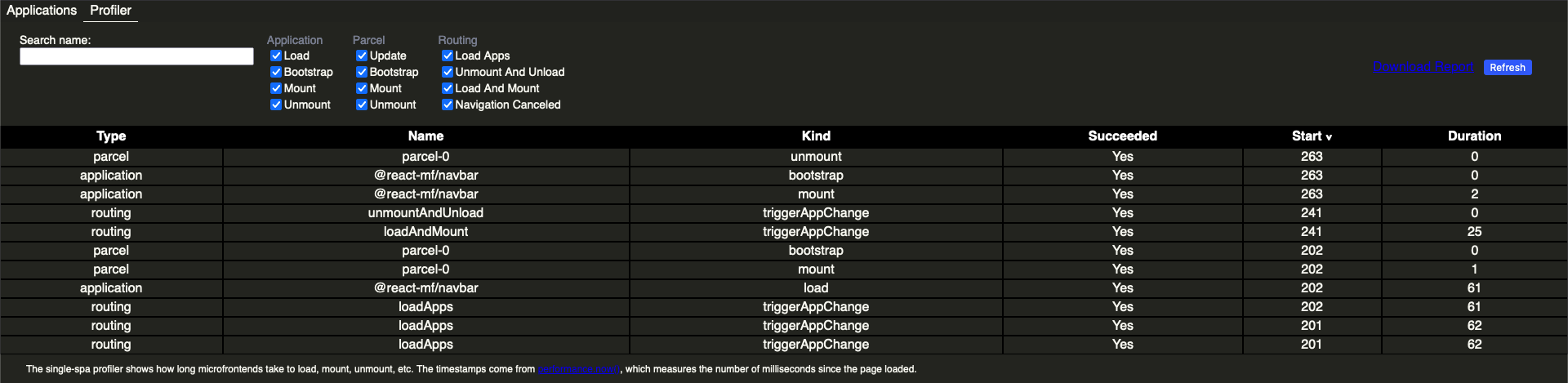
Screenshot of one-spa-inspector profiler tab

Fixes

  • Fix regression with parcel name Github link
  • Ensure all reroute promises (triggerAppChange() return value) resolve even during cancelation Github link
  • fix(types): fix OneSpaAppsByNewStatus interface by @FelixGraf in #988
  • Ensure app is unmounted during unregisterApplication. Resolves #871 by @joeldenning in #875

Maintenance

  • Switch from yarn -> pnpm Github link
  • Upgrade all dependencies Github link
  • Upgrade husky from v4 to v7. Use pinst to avoid issues with yarn 2 users as described in https://typicode.github.io/husky/#/?id=yarn-2 Github link
  • Upgrade to Jest 27. Fix tests to work with Jest 27. Github link
  • Upgrade to Node 16. Fix tests to work with Node 16 (Fix tests in Node 15 #652) Github link
  • Run upgraded version of prettier on all files. Github link
  • Remove unused babel-eslint dependency Github link
  • Upgrade to new package names for all rollup plugins. (@rollup/plugin-node-resolve instead of rollup-plugin-node-resolve) Github link
  • Remove file size impact workflow since it's broken. by @joeldenning in #879
  • Remove console.log in test by @joeldenning in #878
one-spa 5

· 4 min read

Today we released [email protected].

Here are the highlights:

Release notes here

Migration from 4 to 5

For every user we're aware of, you do not need to change anything in your code in order to upgrade to one-spa@5. The breaking changes listed in the release notes are the removal of features that were never documented.

If installing from npm, you can simply npm install --save [email protected] or yarn add [email protected].

Alternatively, one-spa is available on cdnjs, jsdelivr, and unpkg.

The one-spa core team is committed to treating our users well, which includes not introducing massive breaking changes. The core one-spa API has not seen massive breaking changes since one-spa@3 in August 2016. We have added features and improved things, but one-spa is a stable technology. We are committed to maintaining it, documenting it, and adjusting it as technologies like in-browser modules become more and more popular and viable.

Performance improvements

The ESM version of one-spa@4 was 23.8kb (7.2kb gzipped). That was improved in one-spa@5 to 15.5kb (5.1kb gzipped). We did this by optimizing our build process and removing unused features.

one-spa CLI

Since one-spa's inception, bundler configuration has been a huge source of user pain. We have heard this pain and implemented create-one-spa, which creates (and sometimes can update) repositories that are ready to be used as one-spa microfrontends. For Angular and Vue, the official CLIs are used with a few extra plugins automatically installed. For React, a default webpack config with decent eslint / prettier defaults is set up.

Additionally, we have added a lot of documentation for webpack in The Recommended Setup.

New example repositories

What started out as one company's special sauce for independently deployed frontend microservices is now fully accessible to the public with our new set of example repos. We have a React example, a Vue example, and a polyglot (multiple framework) example. We hope to add an Angular example, after we achieve support for Angular 9. These example repositories are actively watched and maintained, and reflect our current opinions on the best, production-viable way to do microfrontends.

Furthermore, we have deployed each of the examples to our new domains:

Documentation overhaul

We removed several dated documentation pages, and added several that were very much lacking. Here are a few pages that give you the most bang for your buck:

Development builds and error codes

Taking inspiration from the react development and production builds, we now publish to NPM both development and production builds in the following formats: UMD, ESM, and System.register.

You can see the published build files here. The .dev.js files provide full debugging information in the browser console, whereas the .min.js files give you a numeric error code and a link to a documentation page that explains the error. We hope that these error codes and documentation for them will improve discoverability of relevant documentation when you're setting up one-spa.

An example of these new documentation pages for error codes is found here.

Governance

The project is fully managed by the open source community.

This change does not mean anything drastic for one-spa. Its license was and is MIT, and we have no plans to do anything with the project besides make it better.

Where next?

We are actively translating the one-spa documentation to Chinese, and hope to add other languages soon. We will add full Angular 9 support soon, and hope to add server rendering in an upcoming release.

Please contribute to our code and ecosystem.

one-spa Inspector and 4.1

· 2 min read

Background

For a long time, teams have had the benefit of using a tool called sofe inspector (note: this is an out-of-date version of it) to list, override, and interact with one-spa applications. There has always been a desire to figure out how to share this tool so others can benefit as well.

With that in mind, I'm proud to announce an initial release for one-spa Inspector! one-spa Inspector is a Firefox and Chrome extension, much like React/Vue devtools, that allows you see and interact with your one-spa applications and configuration.

Current Inspector Features

  • List registered applications
  • Show application status
  • Force an app to mount or unmount
  • Hover over an app name to have an "inspect element"-like view of your apps (Overlays)

(Note: Overlays require a small update to your code, but should hopefully be simple! See how to configure app overlays)

The one-spa Inspector will only work with one-spa versions 4.1 and higher, since we had to expose and add some functionality to the one-spa library itself in order to implement these features.

one-spa 4.1

one-spa 4.1 was released, which includes a couple of key updates:

  1. Support for one-spa Inspector
  2. ESM bundle output
  3. Simpmlified test configuration for developers/contributors to one-spa

For most people, ESM (EcmaScript Module) support shouldn't affect how you use one-spa, but for those looking to play around with modules or other advanced Javascript things, it's a welcome addition.

We also changed our test suite to purely use Jest instead of Saucelabs, and hopefully false positive "failing" tests on pull requests will be a thing of the past.

Help Wanted!

If you would like to suggest a new feature for one-spa Inspector, report a bug, improve our (admittedly horrible and hopefully temporary) UI/UX, or add features, please see the github repo and hack away!

We also hope to update some of our example repos to the lastest one-spa so that anyone with the extension installed can test out the features and see how to implement overlays. But this process will go faster if someone wants to help out. :)

Thank you!

one-spa parcels, explained

· 5 min read

Ever since [email protected], the one-spa team has been dedicated to bringing microservices to the frontend. We have made it possible for AngularJS, React, Angular, Vue, and other frameworks to coexist side by side in the same page.

And with the release of version 4, I’m pleased to announce that one-spa is expanding that effort so that individual components written with different frameworks can interoperate. It is new terrain for the one-spa community, which previously had focused on getting large applications to interoperate with each other, instead of the individual components.

Another way to do framework agnostic components?

For those familiar with web components and custom elements, you may be wondering why a JavaScript library would try to do what browsers are starting natively to do.

And as one of the contributors to the custom elements polyfill, let me be the first one to say that we did not make this decision lightly.

If you’re interested in diving into the details, check out One Company’s Relationship With Custom Elements, which explains some of the difficulties we’ve been through with web components and custom elements.

TLDR: React and some other frameworks don’t interop with custom elements very well. Additionally dealing with inner HTML, attributes vs properties, and customized builtins can be a pain.

Okay but you haven’t told me what a one-spa parcel is

A parcel is one-spa’s way of building a component in one framework and using it in another.

To implement a parcel, just create a JavaScript object that has 3–4 functions on it. We call this JavaScript object a parcel config and there are three required functions to implement: bootstrap, mount, and unmount. A fourth function, update, is optional.

Each of the functions will be called by one-spa at the right time, but the parcel config will control what happens. In other words, one-spa controls the “when,” but the parcel config controls the “what” and the “how.”

Once you’ve implemented the parcel config, simply call oneSpa.mountRootParcel(parcelConfig, parcelProps) to mount it. This is the key to what makes parcels framework agnostic — regardless of whether the parcel config is implemented with React, Angular, Vue, or anything else, to use the parcel you always just call mountRootParcel().

A few more specifics

We’ve glossed over a few things that I want to touch on real quick:

  • How do you implement the lifecycle functions on the parcel config?

    Use a helper library for your framework of choice. one-spa-react, one-spa-angular (for angular@2+), one-spa-angularjs, one-spa-vue, and others will implement the entire parcel config for you.

  • What are the props you pass to mountRootParcel()?

    The props passed as the second argument to oneSpa.mountRootParcel(parcelConfig, parcelProps) are an object with one required prop and as many custom props as you’d like. The required prop is domElement, which tells the parcel where to mount. And the custom props get passed through to the parcel config lifecycle functions.

  • How do you re-render and unmount a parcel?

    The oneSpa.mountRootParcel() function returns a parcel object that lets you re-render and unmount the parcel whenever you’d like to.

Syntactic sugar makes this easier

Calling all of those functions manually might get annoying. So let’s make it easier. Here’s an example of some syntactic sugar for React. Similar features will be added soon for Angular, Vue, and other frameworks.

How hard is it to try this out?

You can get started with parcels immediately, without using the rest of one-spa. To do so, either npm install or script tag one-spa, then call mountRootParcel with your first parcel config.

You can also check out this codepen example to start out.

And if you are already a user of one-spa applications, parcels mean that your applications can mount and unmount shared functionality whenever you want them to. Since parcels don’t have activity functions, you don’t have to set up routes for them.

Let us know what you think!

We’d love to get your feedback on parcels. What do you think of this new way of framework interop? Is the implementation easy to understand? Are parcels useful for you or do they not quite fit into what you’re trying to accomplish?How hard was it for you to try out?

Check out the official docs for more examples, explanations, and api documentation.

And let us know your thoughts in a Github issue!

A step-by-step guide to one-spa

· 11 min read

Running Angular 1, React, Angular 2, and Vue.js side by side sounds pretty cool. And it seems appealing to have multiple applications coexisting on the same page, each lazily loaded.

But using one-spa for the first time can be tricky because you’ll come across terms like “application lifecycles”, “root application”, “loading function”, “child application”, and “activity function.”

This blog post will take you through setting things up and what choices you have when using one-spa. It’s based on a real migration from an Angular 1 monolith to an Angular 1, React, and Svelte polyglot.

If you’d like to jump straight to a fully working, self contained code example, check out this webpack one-spa starter project.

Step One: choose a module loader.

Your module loader / bundler is the library you’ll use to lazy load code. I recommend either Webpack or JSPM, if you’re starting from scratch.

If you go with Webpack, try to use Webpack 2 if you can, since it has support for promise-based lazy loading. This will make things easier for you later on, since one-spa requires that your loading functions return promises. If you can’t use Webpack 2, getting one-spa to lazy load your code with Webpack 1 will require some boilerplate code.

JSPM/SystemJS has worse documentation than Webpack, but is a great solution for module loading if you can get past that. I recommend using [email protected] — it’s still in beta but has been worked on for over a year and has proven stable enough to use in production.

If you’re struggling to decide between the two, then ask yourself the following: Do I want multiple completely separate bundles? If you don’t, I recommend Webpack because it has better docs, a larger community, and fewer gotchas. Otherwise, I’d go with JSPM, since Webpack has no plans to support dynamic runtime loading (See tweet below from Mr. Larkin, himself).

Step Two: create a brand new HTML file

The next step is to create what one-spa calls your “root application.” Really your root application is just the stuff that initializes one-spa, and it starts with an HTML file.

Even if you’ve got an existing project that already has it’s own HTML file, I recommend starting fresh with a new HTML file. That way, there is a clear distinction between what is in your root application (shared between all apps) and what is in a child application (not shared with everything).

You’ll want to keep your root application as small as possible, since it’s sort of the master controller of everything and could become a bottleneck. You don’t want to be constantly changing both the root application and the child applications.

So for now, just have a <script> to a single JavaScript file (root-application.js), which will be explained in Step Three.

Since Webpack is probably the more common use case, my code examples from here on will assume that you’re using Webpack 2. The equivalent Webpack 1 or JSPM code has all the same concepts and only some minor code differences.

<!doctype html>
<html>
<head>
<meta charset="utf-8" />
<meta name="viewport" content="width=device-width" />
<title>A one-spa application</title>
</head>
<body>
<div id="cool-app"></div>
<script src="root-application.js"></script>
</body>
</html>

Step Three: register an “application”

Now it’s time to finish up your root application by writing your “root-application.js” file. The primary purpose of root-application.js is to call oneSpa.registerApplication(..) for each of the applications that will be managed by one-spa.

If you’re into analogies, you can think of one-spa as the operating system for your single page application, managing which “processes” (or “child applications”) are running at any given time. At any moment, some of the child applications will be active on the DOM and others will not. As the user navigates throughout the app, some applications will be unmounting from the DOM and others will be mounting to the DOM.

Another way to look at it is that one-spa is a master router on top of your other routers.

To do this, first npm install one-spa and then call the registerApplication function:

import { registerApplication, start } from "one-spa";

// Register your first application with one-spa. More apps will be registered as you create them
registerApplication("cool-app", loadCoolApp, isCoolAppActive);

// Tell one-spa that you're ready for it to mount your application to the DOM
start();

// This is a "loading function"
function loadCoolApp() {
return import("./cool-app/cool.app.js");
}

// This is an "activity function"
function isCoolAppActive() {
return window.location.hash.startsWith("#/cool");
}

Because one-spa is so very cool, we’ve created an app called “cool-app” that will be lazy loaded and mounted to the DOM whenever the url hash starts with #/cool.

The loadCoolApp function is what one-spa calls a loading function. Inside of it, the import introduces a code splitting point — Webpack will create separate code chunks that will be lazy loaded by one-spa.

For your specific project, you probably won’t have a hash prefix of “cool”, but I recommend establishing some kind of convention that makes it easy to determine which apps are active. This will simplify the maintenance of your activity functions, as you add more and more child applications.

If you’re going to start out with just one child application, then it might make sense to implement the activity function as () => true. You can worry about getting fancier once you have more than one application.

The last thing is to call start(). This is something you must do for things to work. The purpose is to give control over timing and performance. But until that is a concern, start is just one of those things you do, and then maybe read about it later if you ever need to.

Step Four: create “.app.js” file

When you open up your index.html file in the browser, you’ll now see….. a blank screen! We’re really close, but there’s one crucial step left: building your app.js file.

After that, you’ll have everything working for your first one-spa application.

An app.js file is a configuration file that you create for each child application. It is the code that is lazy loaded when your activity function returns true.

There are three things that you need to implement in the app.js file:

  1. A bootstrap lifecycle
  2. A mount lifecycle
  3. An unmount lifecycle

A “lifecycle” is a function or array of functions that will be called by one-spa; you export these from the app.js file. Each function must return a Promise so that one-spa knows when it is completed.

Here is a simple example:

// one-spa will import this file and call the exported lifecyle functions

let user;

export function bootstrap() {
return fetch("/api/users/0")
.then((response) => response.json())
.then((json) => (user = json));
}

export function mount() {
/* This is normally where you would have your framework-specific code like
* ReactDOM.render or angular.bootstrap(). The fact that you can put *anything*
* into this function is what makes one-spa so powerful -- any framework
* can implement a "mount" and "unmount" to become a one-spa application.
*/
return Promise.resolve().then(() => {
document.getElementById("user-app").innerHTML = `
<div>
Hello ${user.name}!
<div>
`;
});
}

export function unmount() {
/* Real world use cases would be something like ReactDOM.unmountComponentAtNode()
* or vue.$destroy()
*/
return Promise.resolve().then(() => {
document.getElementById("user-app").innerHTML = "";
});
}

At this point, you might be seeing the document.getElementById and innerHTML = and worry that you’ve been duped — maybe one-spa is really just a poor excuse for a ui component framework.

And really, don’t we already have a lot of different ways to write UI components?

Getting all of those frameworks to work together.

Using multiple frameworks is where one-spa really shines. It is not a ui framework itself, but a framework for using other frameworks.

Each child application can be written in any framework, so long as it implements application lifecycle functions. Then the mini-apps cooperate to form the entire single page application.

So going back to our previous example, we could choose to write our “cool.app.js” as an Angular 1 app, and choose something else for future apps:

import oneSpaAngularJS from "one-spa-angularjs";
import angular from "angular";
import "./app.module.js";
import "./routes.js";

const domElementGetter = () => document.getElementById("cool-app");

const angularLifecycles = oneSpaAngularJS({
angular,
domElementGetter,
mainAngularModule: "one-spa-app",
uiRouter: true,
preserveGlobal: true,
});

export const bootstrap = [
aboutToBootstrap,
angularLifecycles.bootstrap,
doneBootstrapping,
];

export const mount = [angularLifecycles.mount];

export const unmount = [angularLifecycles.unmount];

function aboutToBootstrap() {
console.log("about to bootstrapping");
return Promise.resolve();
}

function doneBootstrap() {
console.log("finished bootstrapping");
return Promise.resolve();
}

In this example, we use a helper library called one-spa-angularjs which abstracts away the specifics of initializing Angular 1 apps. This blogpost doesn’t show you the app.module.js or routes.js files, but you can see an example implementation here.

The pattern is to call oneSpaAngularJS at the very beginning, which returns bootstrap, mount, and unmount lifecycle functions for you.

You might notice that this time the lifecycles are exported as arrays of functions instead of just functions — you can choose whichever works best for you.

The advantage of exporting an array of functions is that you can add in your own custom behavior (like aboutToBootstrap and doneBootstrap) that will run before or after the Angular 1 lifecycles. When you export an array, each item in the array must be a function that returns a promise. One Spa will wait for each promise to resolve, in order, before calling the next function in the array.

To learn more about one-spa helper libraries, check out these github projects:

You can also see a fully working example of an angular app coexisting with other apps at the one-spa-examples repo or the live demo.

Step Five: test it out!

Refresh your page and you should now have a functioning one-spa application!

Try navigating to a url that your child app is active for (#/cool) and then navigating away from it. When you do so, the page will not refresh but you should see your application mount itself to the DOM and then unmount.

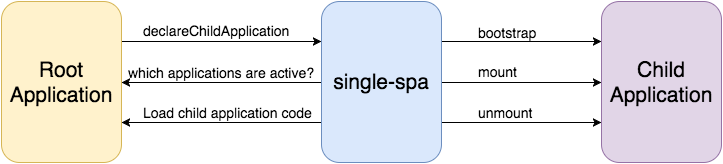
If you run into problems, try to narrow down whether the problem is in the root application or in the child application. Is your root application being executed? Are the declareChildApplication calls being made? Have you called start()? Is there a network request to download the code for your child application? Is your child application's bootstrap lifecycle being called? What about mount?

cdn-images-1

It may be helpful to add a navigation menu, so you can verify everything mounts and unmounts to the DOM correctly. If you want to level up your one-spa skills even more, make the navigation menu an entire child application whose activity function is () => true. An example that does just that is found here and here.

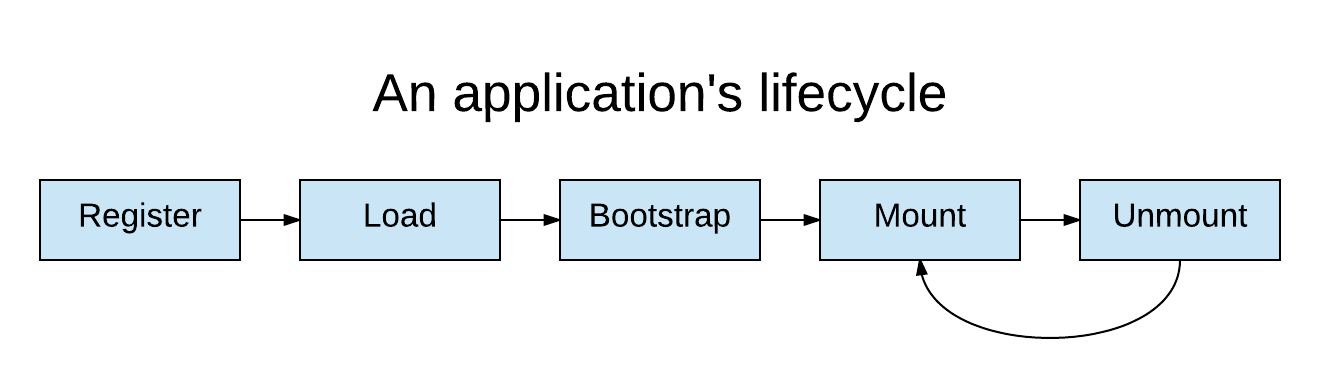
While you are verifying that everything is working, keep in mind that each application goes through five phases:

an applications's lifecycle

Conclusion

As you get your feet wet, you’ll probably run into some (hopefully small) hiccups setting things up. When this tutorial is not enough, there are other resources on Github and here in the docs.

One Spa is still a relatively new thing, and we’d love to hear your feedback and questions. We welcome contributions from everyone.

A Case for SOA in the Browser

· 7 min read

So you are a web-developer. You write a lot of JavaScript. You have a large single-page application (SPA) with features to add and bugs to maintain. Over time the application grows in size and complexity. It becomes more difficult to modify one portion of the SPA without breaking another portion.

The company is growing and you are looking for ways to scale the team and code-base. You add unit tests. You add a linter. You add continuous integration. You modularize the code with ES2015 modules, webpack, and npm. Eventually you even introduce new, independent SPAs with each SPA being owned and deployed by independent squads. Congratulations, you have successfully introduced service-oriented architecture on the front-end, or have you?

What is Service-oriented Architecture?

The fundamental concept behind service-oriented architecture is a service. A service is an isolated piece of code which can only be interacted with through its API. Unlike a shared library, a service itself can be deployed independently of its consumers. Think of a back-end API. The API is the service and the browser is the consumer. The API is deployed independently of the front-end application. There is also only one deployed version of the API available at a URL.

Contrast a service to a shared library. A shared library is a piece of code that is bundled and deployed with your code. For example, libraries such as Express, Lodash, and React are all shared libraries included in your application’s distributable. Upgrading a version of a shared library requires a new deployment of that distributable.

Service-oriented architecture is an approach to building software where the application is composed of many independent and isolated services. Those services are independently deployable, generally non-versioned, and auto discoverable.

Why Service-oriented Architecture on the Front-end?

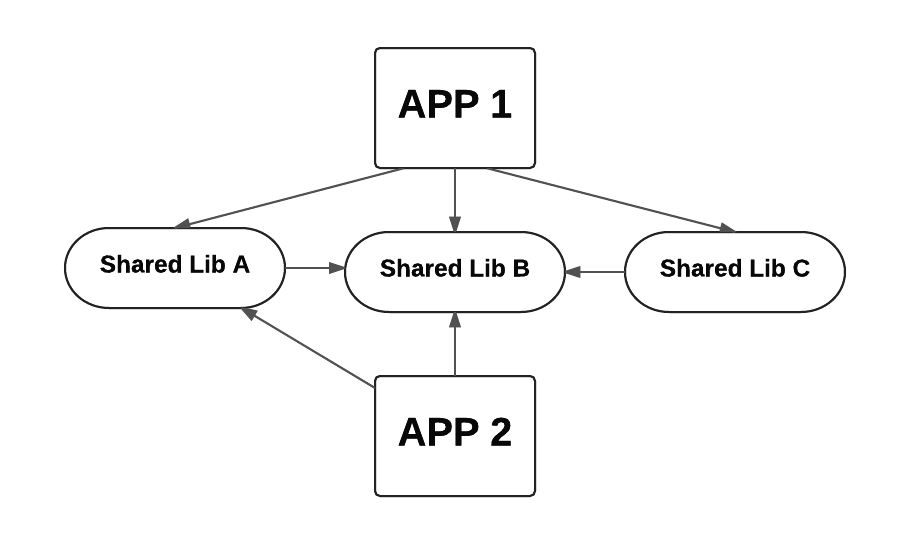
The benefits of SOA can be illustrated with a real life example. Consider an organization with multiple single page applications. The first application is external to the customers and the second is internal, yet both applications share common functionality. That functionality includes among other things, authentication and error logging.

cdn-images-1

Shared libraries between two separate applications. App 1 depends upon shared libs a, b, and c. App 2 depends upon only shared libs a and b.

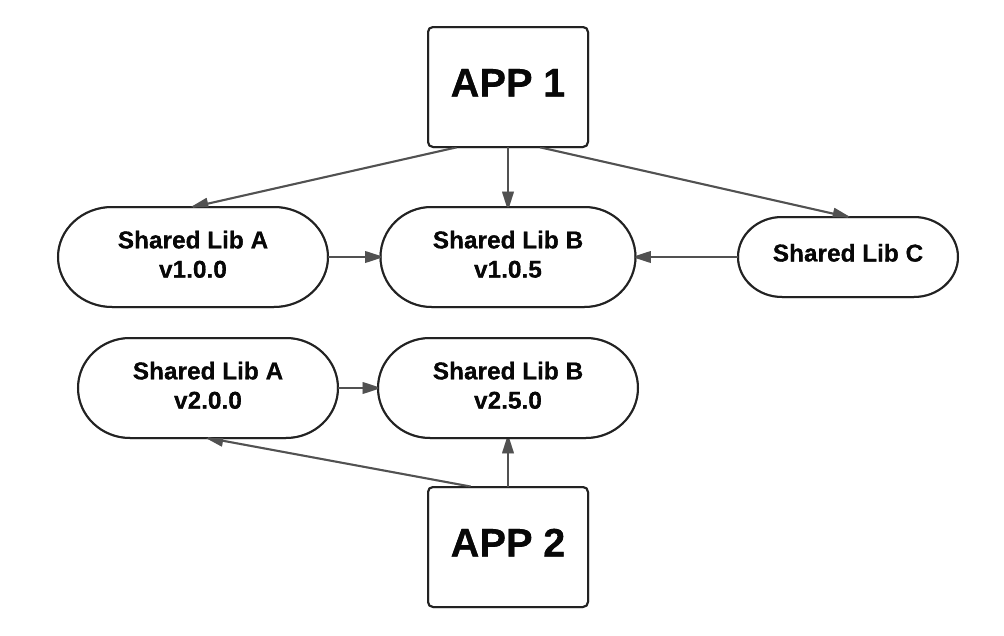
Overall the design looks good. The code is modularized and shared. The complexities arrive when we start to upgrade the code to different versions. For example, after a short period of time, App 2 (being internal only) is upgraded to a new beta version of the shared lib b. Because the shared a also depends upon b (and we don’t want multiple versions of b bundled) we also create a new version of a. This one change causes a rebuild and deploy of three separate pieces of code: App 2 and shared libs a and b. Our dependency structure is no longer quite so simple.

cdn-images-2

In reality, a duplicate instance of lib a and b exist in both apps. Each app does not point to the same instance of the shared libraries, even when they are the same version. This is more noticeable when the shared libraries have separate versions.

Now imagine a bug in both versions of shared lib b. In order to fix the problem, you will have to republish both versions of a and b as well as c. Also App 1 and App 2 will have to be re-deployed. That is five new versions to publish and two apps to redeploy, all to fix one bug. All downstream dependencies have to be redeployed when a single library is changed. This is deploy dependency hell.

Service oriented architecture avoids these problems in a couple ways. Instead of bundling common dependencies, common code is shared through independent services. Services are not bundled, but rather loaded at run time. This also means that front-end services are not versioned (just like a back-end API). Both App 1 and App 2 load the exact same code for a front-end service.

Introducing sofe

Built upon the new ECMAScript module specification, sofe is a JavaScript library that enables independently deployable JavaScript services to be retrieved at run-time in the browser. Because the new module specification isn’t available within today’s browsers, sofe relies upon System.js to load services at run-time.

You can load a sofe service either with static or asynchronous imports.

// Static imports
import auth from "auth-service!sofe";
const user = auth.getLoggedInUser();
// Asynchronous imports
System.import("auth-service!sofe").then((auth) => auth.getLoggedInUser());

The real power behind sofe is that services are resolved at run-time, making them unversioned. If auth-service is redeployed, it is immediately made available to all upstream dependencies. The above scenario becomes much easier to resolve because there is only one version of each shared library as services. This is powerful because it allows you to deploy once, update everywhere. Also because the code is loaded at run-time, we can also enable developer tools to override what service is loaded into your application. Or in other words, you can test code on production without actually deploying to production.

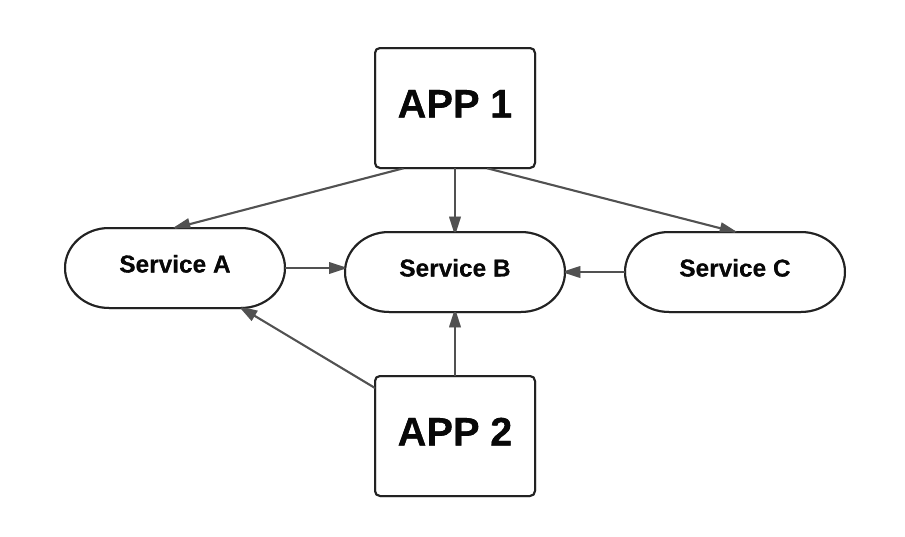
cdn-images-2

The common dependencies are now services that are independent from the application code. Because services are unversioned, the dependency structure is again flat. Each service can individually be deployed and be available to every upstream dependency.

Obviously not all front-end code should be a service. Services have their own challenges. Specifically your code has to stay backwards compatible. But code can’t always be backwards compatible. Sometimes there needs to be breaking changes. The same problem exists for back-end services. A back-end API has to stay backwards compatible. Breaking changes on the back-end are generally solved by either creating an entirely new (versioned) API or implementing feature toggles within the API itself. The same solution applies to sofe services. An entirely new sofe service can be deployed or feature toggles can exist inside the front-end service. However it is solved, the key point is that services exist outside your application within their own distributable.

Another potential problem for sofe services is performance. Because they are loaded at run-time, performance can become a concern if you synchronously load too many services during bootstrap. Performance degradation can be mitigated by asynchronously loading larger services after the application bootstraps. Despite these challenges, there are many benefits to services on the front-end. The most exciting thing about sofe is there is now an option for services in the browser. You can decide what should and shouldn’t be a service.

Getting started with sofe requires only System.js. But to help you get started we have built sofe to work with a variety of technologies, including webpack, Babel, jspm, and the Chrome Developer Tools. Sofe is also actively used in production. We would love feedback on sofe and a number of open source projects that have been built around it. As you approach your next front-end project or look to improve your existing app, consider how it might benefit from service oriented architecture.

Read more about how to get started with sofe here.